


AI Resume Builder CV Maker PDF
4.5408.00 Reviews
App Specs
- Version
- 2.45
- Updated On
- License
- Free
- Downloads
- 1,000,000+
- Developer
- SimpleEvo Apps
- Categories
- Business
- Platform
- Android
Screenshots

 Analysis by AppCompare
I like AI Resume Builder CV Maker PDF best as a practical tool for getting a first, usable draft onto the page when a blank document feels like the biggest obstacle. It is a business app from SimpleEvo Apps, and its focus is clear: help you put your work history into a resume and get a PDF ready to share. I would treat its suggestions as a starting point rather than a substitute for your own judgment, but for someone who needs momentum, that distinction is useful.
A shared device can make the first draft easier
Resume writing is often a short, occasional task rather than something everyone in a household does every week. If you share a phone or tablet, the app can be useful for sitting together while one person enters details and another helps remember dates, responsibilities, or the name of a project. That kind of collaboration can make a rushed application less error-prone, especially when the job seeker has not kept a current resume nearby.
I would still keep each person’s information clearly separate. A resume contains personal contact details and employment history, so it is better to create and review one person’s document at a time, then save or send the finished PDF deliberately. If several people use the same device, agree on where each exported file belongs and use a clear filename that identifies its owner and purpose. Those small habits matter more than trying to turn a shared screen into a shared profile.
A realistic use case is a relative helping someone apply for a role after work. The job seeker can provide the facts while the helper checks spelling and asks whether a duty can be described more precisely. The app’s prompts and AI suggestions may help get words flowing, but the person applying should make the final choices. That keeps the resume in their voice and avoids accidentally presenting a suggestion as a responsibility they never had.
Keep control of details before sharing
The main convenience here is moving from entered information to a portable PDF without needing to begin in a desktop word processor. That is handy when an application needs a document quickly, but speed is not the same as readiness. I recommend checking names, dates, phone numbers, and email addresses character by character before exporting. Then open the PDF and read it as a recruiter might: do the most relevant skills appear early, and can a reader understand each role without guessing?
For a shared-device workflow, pause before sending anything. Confirm that the PDF is the right person’s document and that the destination is correct; a polished file sent from the wrong account or with another person’s details is still a serious mistake. If you are helping someone else, let them inspect the final copy and approve the message themselves. The app makes document creation more convenient, but careful handling remains the user’s responsibility.
One useful trade-off is to use the app for structure and phrasing, then make a separate pass focused only on accuracy. AI wording can sound confident while being too broad for a particular job. Replace vague descriptions with concrete tasks you genuinely performed, and tailor the order of information to the role. This takes a little longer than accepting every suggestion, but it produces a resume that is more credible and easier to discuss in an interview.
Worth Reading Before You Choose

EA SPORTS FC Mobile 26 Is a Bigger Football Game, but It Takes Time

Flipboard Shows What News Apps Must Do Beyond the Feed

Switching to Android Auto Means Rethinking Your Driving Routine

Google Calendar Makes a Crowded Week Easier to Manage

Ludo King Makes the Most of the Minutes Between Plans

Baby Panda World Brings Quick Play to Modern Phones, but Its Game Library Feels Busy
Getting Started with Ease
First things first, downloading the app was a piece of cake. It's available for both Android and iOS, so no one’s left out. Once installed, the interface immediately caught my eye. It’s clean, intuitive, and doesn’t overwhelm you with too many options right off the bat. You know how some apps just throw everything at you at once? Not this one. It guides you step-by-step, which is especially helpful for those of us who aren’t exactly tech wizards.
Designing Your Dream Resume
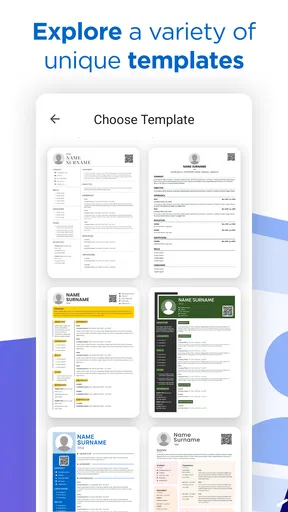
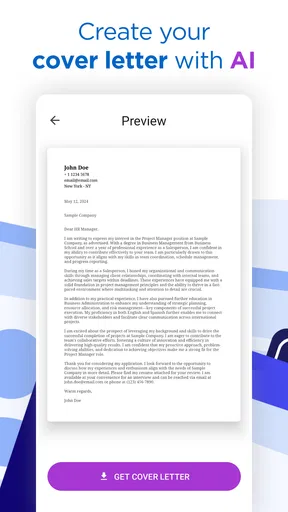
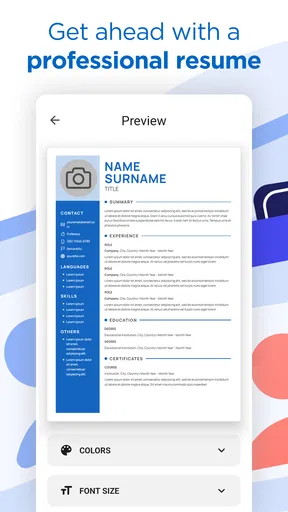
Now, onto the fun part – actually building the resume. AI Resume Builder CV Maker PDF gives you a variety of templates to choose from, catering to different styles and professions. Whether you're going for a sleek, modern look or a more traditional layout, there’s something here for everyone. The app’s AI-driven suggestions are a real game-changer. It’s like having a savvy career coach right in your pocket, offering tips on phrasing and highlighting key skills. Who knew an app could be so insightful?
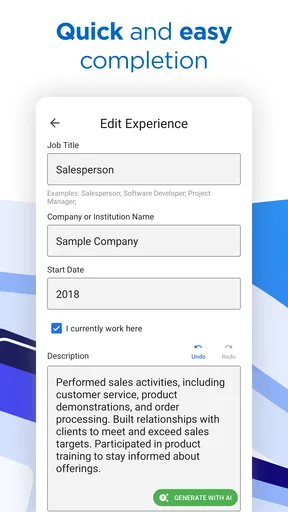
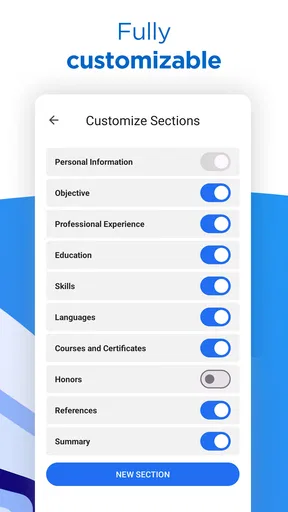
Filling in the details is straightforward. You can import data from LinkedIn, which is a massive time-saver if you’re like me and haven’t updated your resume in a while. The app also provides section prompts, ensuring you don’t forget to include any crucial information. It's like having a checklist built right in.
The Power of PDF
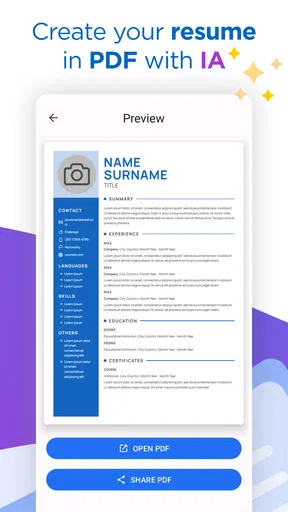
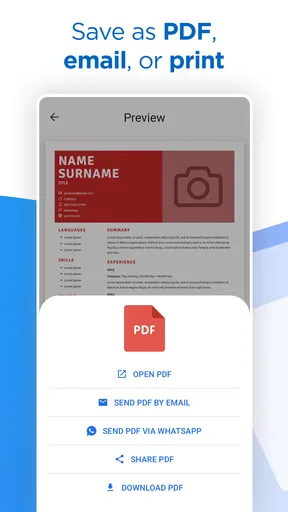
Once you’ve crafted your masterpiece, exporting it to PDF is seamless. The formatting stays crisp and professional – no weird spacing issues or font changes, which is a huge relief. You can download the document directly onto your phone or send it via email without a hitch. This makes applying for jobs on the go incredibly convenient. I tried it out, and within minutes, I had a polished resume ready to impress potential employers.
Room for Improvement?
While the app is pretty fantastic, there are a couple of areas that could be enhanced. For instance, it would be great to see more customization options for the templates. While they’re all well-designed, a bit more flexibility would allow users to truly make the resume their own. Additionally, some users might find the free version a bit limiting, as premium features do come with a price tag. But, considering the quality of the output, it might just be worth the investment.
Where it fits among resume tools
The app has a 4.6 average from around 28,000 ratings and has passed a million installs, which suggests it has found an audience among people who want a phone-friendly route to a finished document. It is free to install, rated for Everyone, and offers in-app purchases ranging from $0.49 to $47.99 per item. I would check the available options in the app before committing to a paid feature, especially if you only need one resume and are unsure whether a particular template or tool is essential.
Compared with starting from a blank document in a word processor, the guided prompts can reduce the effort of deciding what sections to include. A conventional editor is usually better if you already have a carefully designed resume, need exact control over spacing and typography, or want to build a highly distinctive portfolio-style document. A career service or a knowledgeable human reviewer may be more valuable when you are changing industries, explaining a complicated work history, or applying for a senior role where positioning matters as much as layout.
I see this app as a middle ground: more guided than a blank page, but not a replacement for thoughtful editing. Its strongest fit is a job seeker who wants a straightforward layout, needs help getting started, and values being able to prepare a PDF from a mobile device. It is less compelling for someone who already has a polished resume and only wants fine-grained design control. In that case, the time spent adapting a template may outweigh the convenience of starting in the app.
Make the prompts work for your situation
A small but useful workflow is to gather the facts before opening the builder. Write down your recent job titles, dates, education, and a few examples of work you can explain clearly. Then use the prompts to organize those details instead of trying to remember everything while moving through the form. This can help prevent a common weakness in quick resume tools: polished language that lacks specific evidence. For each suggested skill or phrase, ask yourself whether you could give a real example in an interview.
If you are returning to work after a break or have experience across several kinds of jobs, resist the urge to include every detail just because there is space. Choose the experience most relevant to the role and use the app’s structure to make that information easier to scan. Someone applying for several different kinds of work may also want to keep separate versions of their resume, each with a different emphasis, rather than repeatedly editing one general document and risking a last-minute mismatch.
The LinkedIn import mentioned in the app’s workflow can save retyping, but imported information should not be treated as automatically current or ready for an application. Review job descriptions, dates, and wording against your own records. Social profiles and resumes serve different purposes, so a short profile summary may need more context before it becomes a useful resume statement. The time saved on entry is best spent checking accuracy and tailoring the document.
Who should use it—and who may prefer another route
I would recommend trying it if you are a student, a recent graduate, or someone updating an older resume who wants clear prompts and an exportable document without settling in at a computer. It can also suit a busy person preparing an application between other tasks, provided they leave enough time for a careful review. The free starting point makes it easy to explore the workflow, while the paid items mean it is sensible to decide what you actually need before purchasing anything.
I would skip it as my main tool if the resume needs unusually precise formatting, if you are preparing a design-heavy portfolio, or if you need expert advice about how to present a complex career change. The AI can help with phrasing, but it cannot know which achievements are most persuasive unless you supply accurate context. Nor should its suggestions be taken as verification of qualifications or employment history. A human editor who understands your field can be a better choice when the stakes are high and the story needs careful shaping.
For ordinary applications, though, the practical question is not whether an app can produce the perfect resume automatically; it is whether it helps you produce a clear, truthful draft sooner. In my view, this one is most useful when you use its structure to get unstuck, then make deliberate edits yourself. That balance keeps the convenience without handing over decisions that belong to the applicant.
Age, trust, and household expectations
Although the content rating is Everyone, the app is built around employment documents, so the main question for younger users is whether they have a real need to create a resume and an adult who can help review it. A young person preparing for a first part-time job may benefit from learning how to describe school projects, volunteering, or practical responsibilities honestly. They should not enter another person’s private details simply because the device is shared, and a parent or guardian can help check the final document before it is sent.
For adults helping family members, I would keep the job seeker involved rather than taking over the process. Ask before entering contact information, explain any wording changes, and make sure the final PDF belongs to the person applying. These are straightforward boundaries, not special app controls. They help preserve privacy and give the applicant confidence that they understand what their resume says.
The app is currently version 2.45 and supports Android 6.0 or later. Those details make it relevant to people using older compatible Android devices, while its availability on iOS also gives households with different phone platforms a way to use the same kind of resume workflow. SimpleEvo Apps develops it, but the most important trust check is still personal: review every detail yourself before sharing a document that represents your work history.
Final Thoughts
All in all, AI Resume Builder CV Maker PDF is a solid choice for anyone looking to streamline the resume creation process. Its user-friendly interface and smart AI suggestions make it a standout in a sea of similar apps. Whether you’re a fresh graduate or a seasoned professional, this app can save you time and take your resume to the next level. So next time you’re dreading the task of resume writing, give this app a try – you might just find yourself enjoying the process!
My household verdict is that it works best as a guided drafting tool, not as a shared account or an automatic career adviser. It can help one person get a resume into shape while another offers a second pair of eyes, but each applicant should control their own information and approve their own PDF. If you want an approachable way to move from scattered notes to a presentable document, I think it is worth a look. If exact design control or deep career coaching is your priority, choose a more specialized option and use this app only where its guided workflow genuinely saves effort.
Pros
- User-friendly interface for easy navigation.
- Wide range of customizable templates.
- Instant PDF export for quick sharing.
- AI-driven suggestions enhance content quality.
- Supports multiple languages for global users.
Cons
- Limited free features without subscription.
- Occasional lag on older devices.
- Customization options can be overwhelming.
- Requires internet for full functionality.
- Ads in free version can be intrusive.
FAQs for AI Resume Builder CV Maker PDF
What features does the AI Resume Builder CV Maker PDF offer?
The AI Resume Builder CV Maker PDF provides a comprehensive suite of features to help users craft professional resumes. It includes customizable templates, AI-driven suggestions for content improvements, and real-time formatting. Additionally, the app offers options to export resumes in various formats, including PDF, ensuring compatibility with most job application platforms.
Is the AI Resume Builder CV Maker PDF user-friendly for beginners?
Yes, the app is designed with an intuitive interface that guides users through each step of the resume creation process. Beginners can easily navigate through the template options and input sections, while the AI offers helpful tips and suggestions to enhance the content and layout, making it ideal for those new to resume building.
How secure is my personal information on the AI Resume Builder CV Maker PDF?
The app prioritizes user privacy and employs strong encryption protocols to protect personal information. Users' data is stored securely, and the app does not share any information with third parties without explicit consent. It’s always recommended to review the app’s privacy policy for specific details regarding data handling.
Can I customize the templates in the AI Resume Builder CV Maker PDF?
Absolutely. The app offers a variety of templates that can be easily customized to match your personal style and the specific requirements of different industries. Users can adjust fonts, colors, and layout elements to create a unique and standout resume that aligns with their personal branding.
Does the AI Resume Builder CV Maker PDF support multiple languages?
Yes, the app supports multiple languages, making it accessible to a diverse user base. Users can create resumes in various languages, which is particularly beneficial for those applying to international positions or companies that require multilingual documentation. Check the app settings to see the full list of supported languages.


